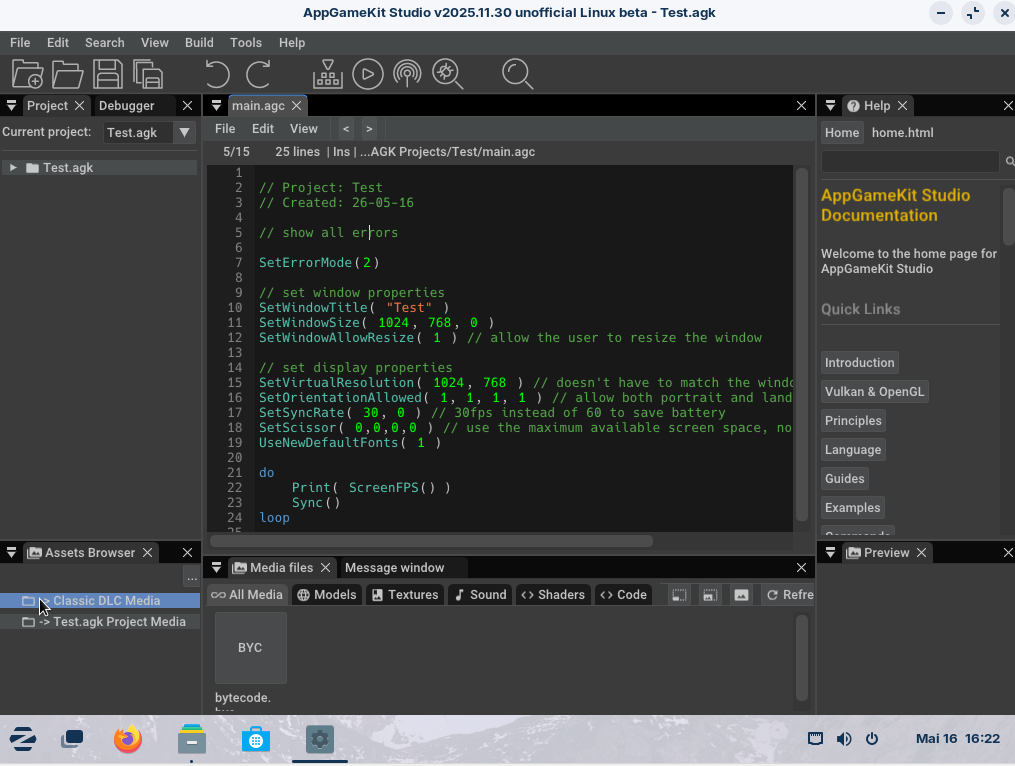
AppGameKit Studio for Linux
A downloadable tool for Linux
Approved for release as a third-party tool: Dark Basic Software Limited (DBS), does not offer support nor development by DBS or any of their team.
What is the aim of this project?
The aim of this project is to allow AppGameKit Studio to run on Linux with (nearly) the same version available on Windows. It’s based on the official AppGameKit Studio source code.
The project is still in development and may contain bugs not present in the official version of AGK Studio. Furthermore, not all features are working yet.
If you need a stable version of AGK Studio (e.g. commercial use), you may use the official Windows version instead.
What is AppGameKit?
AppGameKit is a great engine for beginners, hobbyists and indie developers, as it use an accessible script language in BASIC dialect. You can create 2D and 3D games without a steep learning curve.
Check out the official Steam product page to learn more about AppGameKit Studio:
https://store.steampowered.com/app/1024640/AppGameKit_Studio/
Current state
What does this build offer:
- Updated AGK Studio to v2025.11.30 (Updated IDE)
- VSCode extension for Linux (experimental; doesn't work with flatpak version)
Planned (not part of the build yet):
- Implement video core commands
- bug fixes
- support for a wider range of Linux distros and versions
Limitation
You can export to Linux (Tier 1) only for now.
If you copy the Android and HTML export files from official AGK Studio release into their respective folders, the IDE will also make use of them, but they are not shipped with AGK Studio for Linux.
For Android export you also need to install a jdk (openjdk 17 should work; to install jdk17 you can use "sudo apt install openjdk-17-jdk").
How to use AppGameKit for Linux?
You need to download the tar file and extract it. After that you should be able to launch “AgkStudio64” and use AppGameKit for Linux. You may need to install libopenal1 in case it doesn't work.
In case you want to use the VSCode extension, install the .vsix file (located in VSCode folder). Once installed, you need to point the extension to the AppGameKit Studio directory. Note that flatpak version of VSCode may not work.
(Technically the same procedure as in Windows; check the guide by VirtualNomad: https://steamcommunity.com/sharedfiles/filedetails/?id=3513285841 ).
Legal
Approved for release as a third-party tool: DBS, does not offer support nor development by DBS or any of their team.
AppGameKit and the AppGameKit Logo are copyright DarkBasicSoftwareLimited.
All Rights Reserved.
To use AppGameKit Studio for Linux, you have to agree to the AGK EULA ( https://github.com/Dark-Basic-Software-Limited/AGKRepo/blob/main/AGK/AgkIde/media/eula.txt ).
Also you agree to:
THE SOFTWARE IS PROVIDED "AS IS", WITHOUT WARRANTY OF ANY KIND, EXPRESS OR IMPLIED, INCLUDING BUT NOT LIMITED TO THE WARRANTIES OF MERCHANTABILITY, FITNESS FOR A PARTICULAR PURPOSE AND NONINFRINGEMENT. IN NO EVENT SHALL THE AUTHORS OR COPYRIGHT HOLDERS BE LIABLE FOR ANY CLAIM, DAMAGES OR OTHER LIABILITY, WHETHER IN AN ACTION OF CONTRACT, TORT OR OTHERWISE, ARISING FROM, OUT OF OR IN CONNECTION WITH THE SOFTWARE OR THE USE OR OTHER DEALINGS IN THE SOFTWARE.
Support
For support you can use the discussion board here (on itch.io) (I will add more channels later): https://white3.itch.io/appgamekit-studio-linux/community
For general programming questions (e.g. coding related questions) you can also use the official AGK discord server (Please do NOT address issues with the Linux version there):
System requirements
Despite OS same as official AGK Studio...
OS: Ubuntu 22.04 LTS or Ubuntu 24.04 LTS (may work with others)
Checksum
| SHA256 | 3D19EE0357277C0E7A9AFC4C92C38E98356CEE0110A97DC1708D35A1BB22CE33 |
| MD5 | D0860EDC1E5CB9DDC769DCA9FDCD6C7E |
If you have any other questions, feel free to use the discussion board here.
Download
Install instructions
Keep in mind with downloading and/or using AppGameKit Studio for Linux you agree to the EULA and conditions mentioned in "Legal" section of this itch.io page.
- Download and extract the tar.xz file.
- install libopenal1 (sudo apt install libopenal1) if needed.
- Now you should be able to execute AgkStudio64 and use AppGameKit Studio for Linux :) .
For installing VSCode extension please refer to the Steam Guide by Virtual Nomad:
https://steamcommunity.com/sharedfiles/filedetails/?id=3513285841
In case you own the official version:
If you copy the Android and HTML export files from official AGK Studio release into their respective folders, the IDE will also make use of them, but they are not shipped with AGK Studio for Linux.
For Android export you also need to install a jdk (openjdk 17 should work; to install jdk17 you can use:
sudo apt install openjdk-17-jdk
Development log
- AppGameKit Studio for Linux initial launchMay 27, 2026